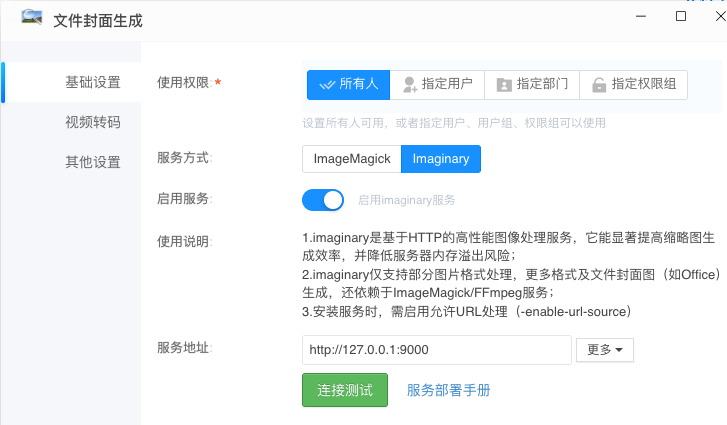
封面预览组件安装 - imaginary
提示:
- imaginary 是一个高性能、无状态的图像处理服务,常用于图像缩放、裁剪、格式转换等操作。
- KodBox 配合 imaginary 能显著提升文件封面图生成效率。
- ARM 版本使用
registry.cn-hangzhou.aliyuncs.com/kodcloud/imaginary:arm64- 龙芯版本使用
registry.cn-hangzhou.aliyuncs.com/kodcloud/imaginary:loongarch64
使用 Docker 安装 imaginary
$ docker run -itd -p 9000:9000 --name imaginary -m 4g --cpus=4 --restart always --tmpfs /tmp:size=1024m \
  registry.cn-hangzhou.aliyuncs.com/kodcloud/imaginary \
  -enable-url-source \
  -concurrency 15 \
  -max-allowed-resolution 500 \
  -key your_api_key_here
参数说明:
-m 4g --cpus=4:限制最大可用资源为 4 GB 内存、4 核 CPU。--tmpfs /tmp:size=1024m:强制 tmp 走内存(不留缓存)。-enable-url-source:允许从 URL 拉取图像。-concurrency:处理并发数。-max-allowed-resolution:最大允许像素,单位 MP。-key:API 认证密钥。
或者使用 compose.yml 配置,参考:
services:
  imaginary:
    image: registry.cn-hangzhou.aliyuncs.com/kodcloud/imaginary:latest
    container_name: imaginary
    restart: always
    ports:
      - 127.0.0.1:9000:9000
    environment:
      - PORT=9000
    tmpfs:
      - /tmp:size=1024m
    command: >
      -enable-url-source
      -concurrency 15
      -max-allowed-resolution 500
    deploy:
      resources:
        limits:
          memory: 4096M  # 等价于 -m 4g
          cpus: '4.0'    # 等价于 --cpus=4
完整运行参数请参考 h2non/imaginary。
然后在封面生成插件中填写 imaginary 接口地址即可,如 http://[IP]:9000。